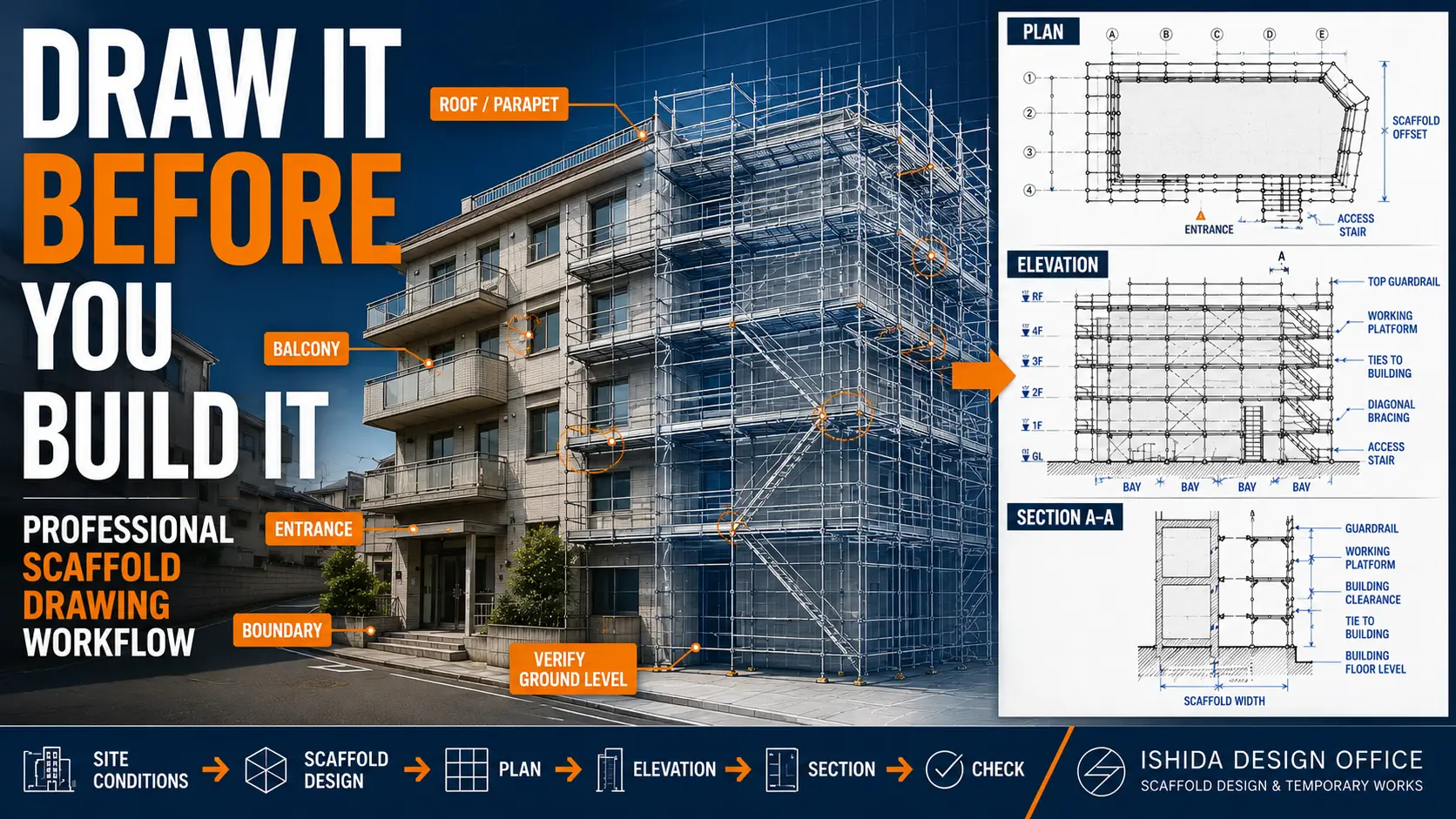
A scaffold drawing should not begin with scaffold lines.
It should begin with the building.
After more than 30 years working with temporary works and scaffold drawings in Japan, this is still one of the most important lessons I have learned.
Before deciding bay lengths, lift heights, ties, bracing, or access, I first try to understand:
- the building
- the available site space
- the work to be carried out
- the scaffold system
- the important restrictions
Only then do I begin creating the scaffold geometry.
My basic workflow is:
Site Information → Work Requirements → Scaffold System → Basic Geometry → Plan → Elevation → Section → Access → Ties & Bracing → Details → Cross-Check → Final Drawing
The sequence itself is simple.
The difficult part is making good decisions inside each step.
This article is not a CAD software tutorial.
Instead, I want to explain how I think about a scaffold before and while I draw it.
That distinction matters.
A CAD operator can draw lines quickly.
A scaffold designer must understand what those lines mean on the real site.
And throughout the process, I keep one question in mind:
Can this scaffold actually be built as shown?
IMPORTANT
Requirements vary by country, jurisdiction, scaffold system, and project.
Always follow local regulations, project specifications, and the scaffold manufacturer’s instructions.
What You Will Learn
By the end of this article, you should understand:
- what information to collect before drawing
- how to establish the scaffold geometry
- why the plan usually comes before the elevation
- how plan, elevation, and section must work together
- where access, ties, and bracing enter the design process
- how to deal with entrances, balconies, and irregular areas
- how to cross-check the final drawing
- which mistakes commonly create problems on site
If you are still getting comfortable with the relationship between the different drawing views, read:
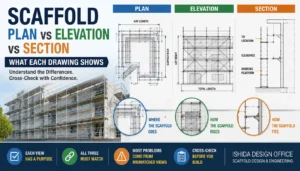
Scaffold Plan vs Elevation vs Section: What Each Drawing Shows
before working through this workflow.
Why Scaffold Drawing Workflow Matters
A scaffold drawing is not simply a picture showing scaffold components around a building.
It is a communication tool.
It connects:
- the designer
- the scaffold contractor
- the site supervisor
- the client
- the safety team
- the workers who will eventually build and use the scaffold
A good drawing makes the scaffold easier to understand, check, erect, and manage.
A weak drawing transfers unanswered questions to the site.
That is where things become frustrating.
A missing entrance, an unrealistic bay arrangement, or a tie placed directly in front of an opening may appear to be a small CAD issue.
On site, however, it can lead to:
- components not fitting
- access being blocked
- workers modifying the arrangement
- additional materials being required
- drawing revisions
- work delays
- additional cost
This is why I do not judge a scaffold drawing only by how clean it looks.
I ask:
KEY IDEA
Does the drawing describe a scaffold that can actually work?
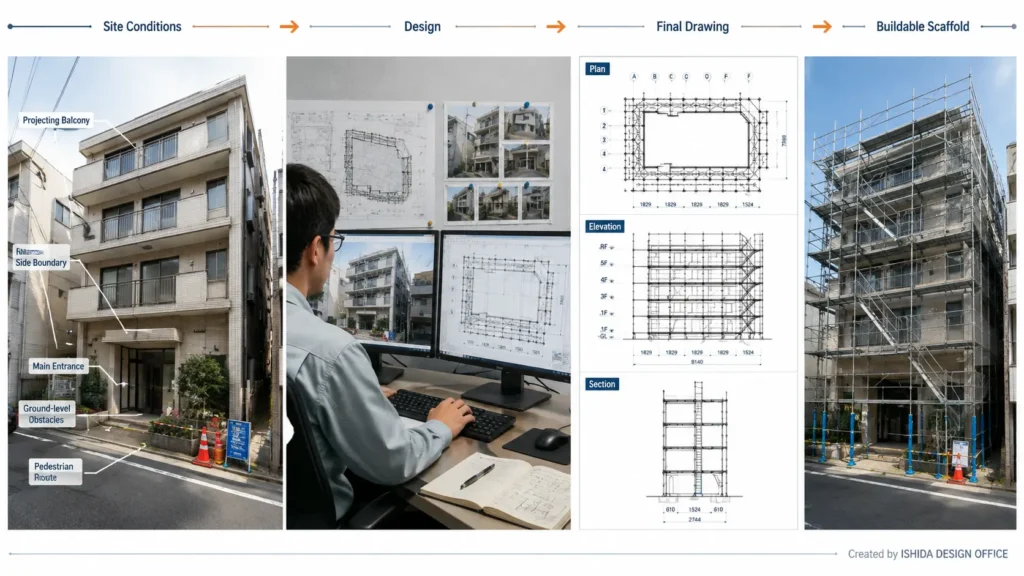
What a Scaffold Drawing Must Achieve
Before discussing the workflow, it helps to define what the final drawing needs to communicate.
A useful scaffold drawing should answer practical questions.
For example:
- Where does the scaffold start and finish?
- How far is it from the building?
- What bay sizes are used?
- Where are the working lifts?
- Where is the access?
- How are corners resolved?
- Where are the ties?
- Where is bracing required?
- What happens around entrances?
- How are balconies or projections handled?
- Does the scaffold fit inside the available site?
- Are there non-standard areas requiring a detail?
The drawing also needs to match the actual scaffold system being used.
This is easy to underestimate.
A dimension can look perfect in CAD but still be impossible to build if the required component does not exist.
That is why I always keep one principle in mind:
The scaffold must work in the real world, not only on the screen.
Basic Scaffold Drawing Terms
For this article:
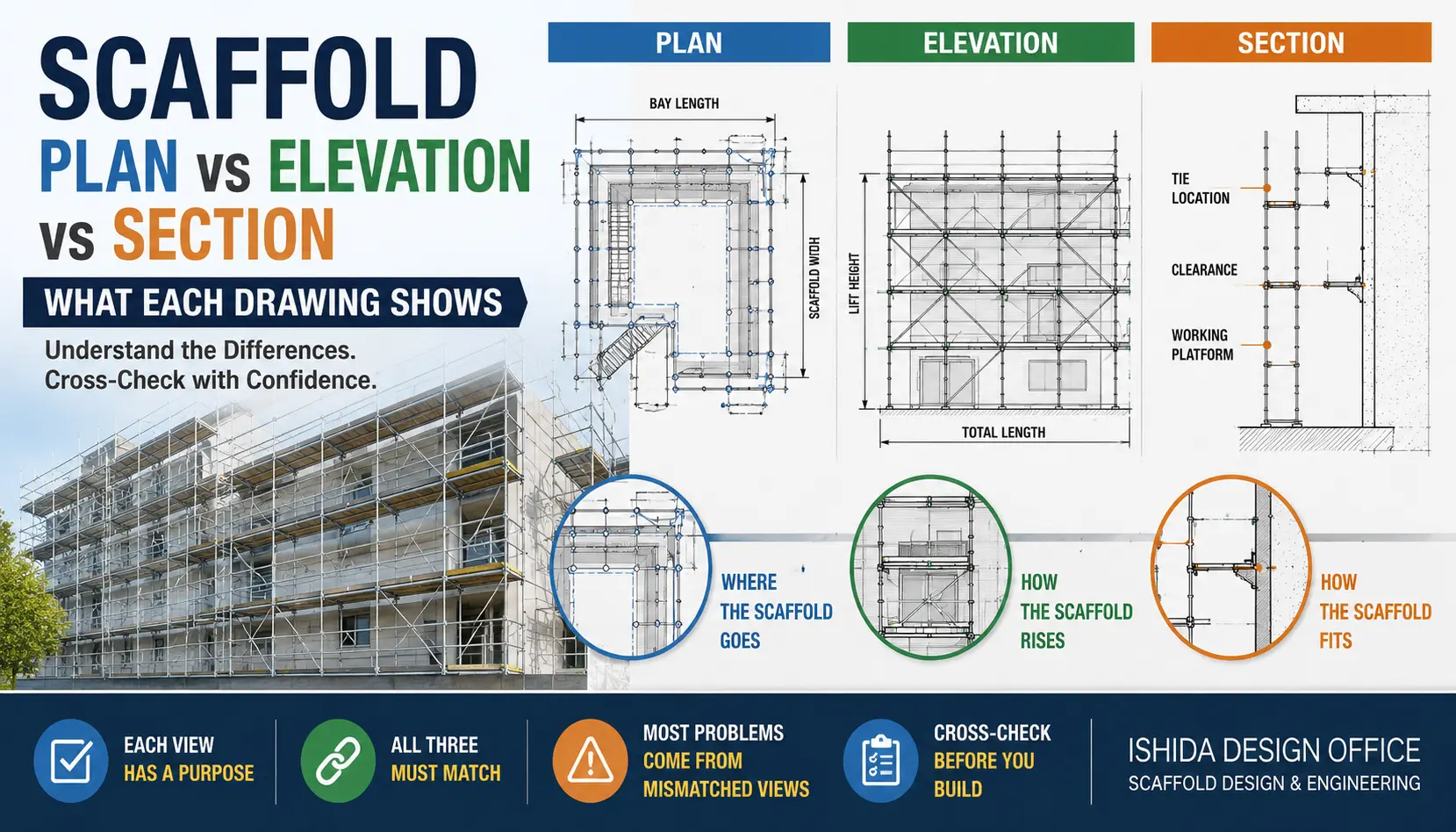
Plan
A horizontal view showing the scaffold arrangement around the building.
Elevation
A vertical view showing scaffold bays, lifts, platforms, ties, bracing, and building levels.
Section
A cut-through view showing the relationship between the scaffold and the building.
Bay
One horizontal scaffold module between adjacent standards.
Lift
One vertical scaffold level.
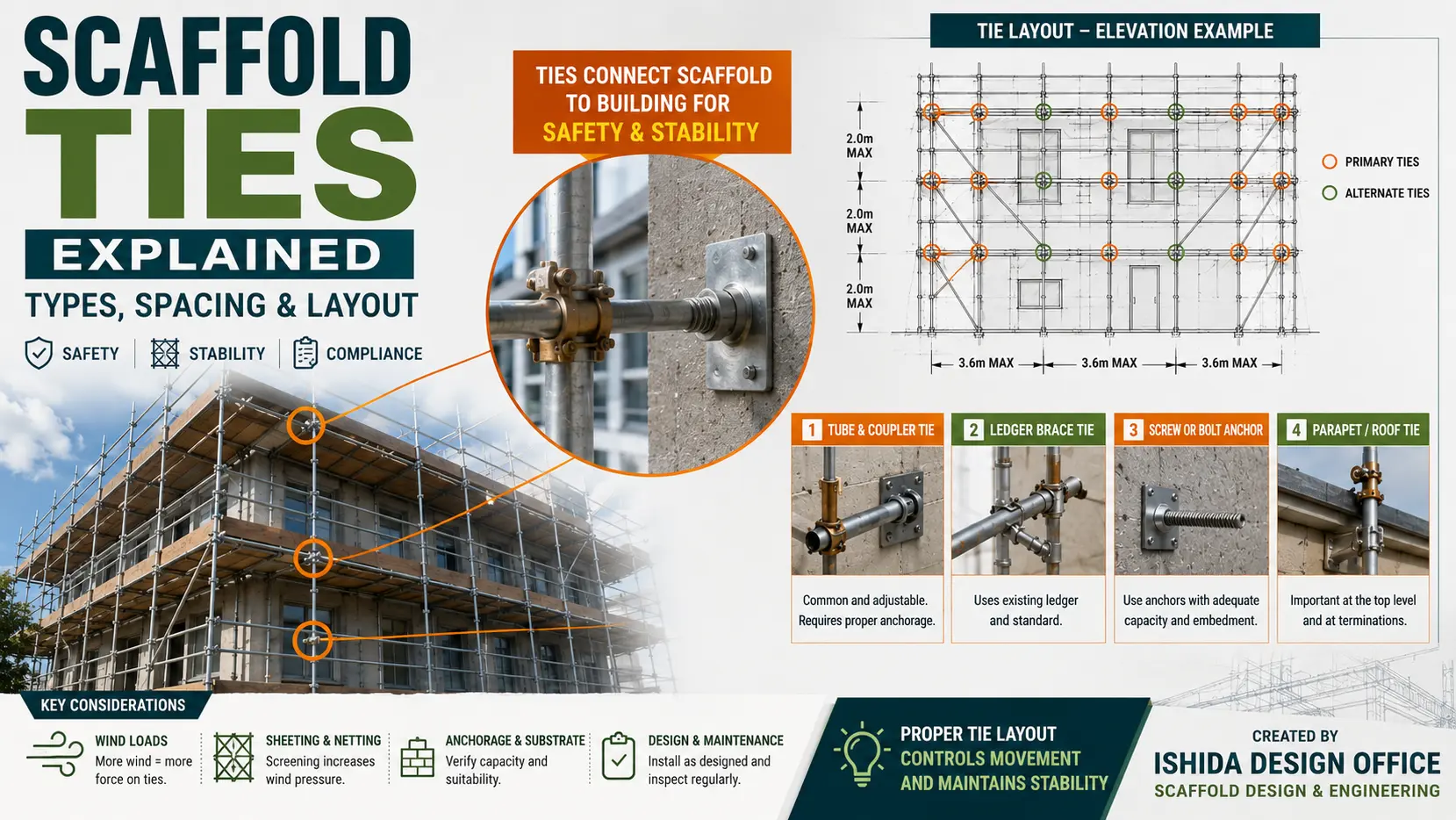
Tie
A connection used to restrain the scaffold relative to the supporting structure.
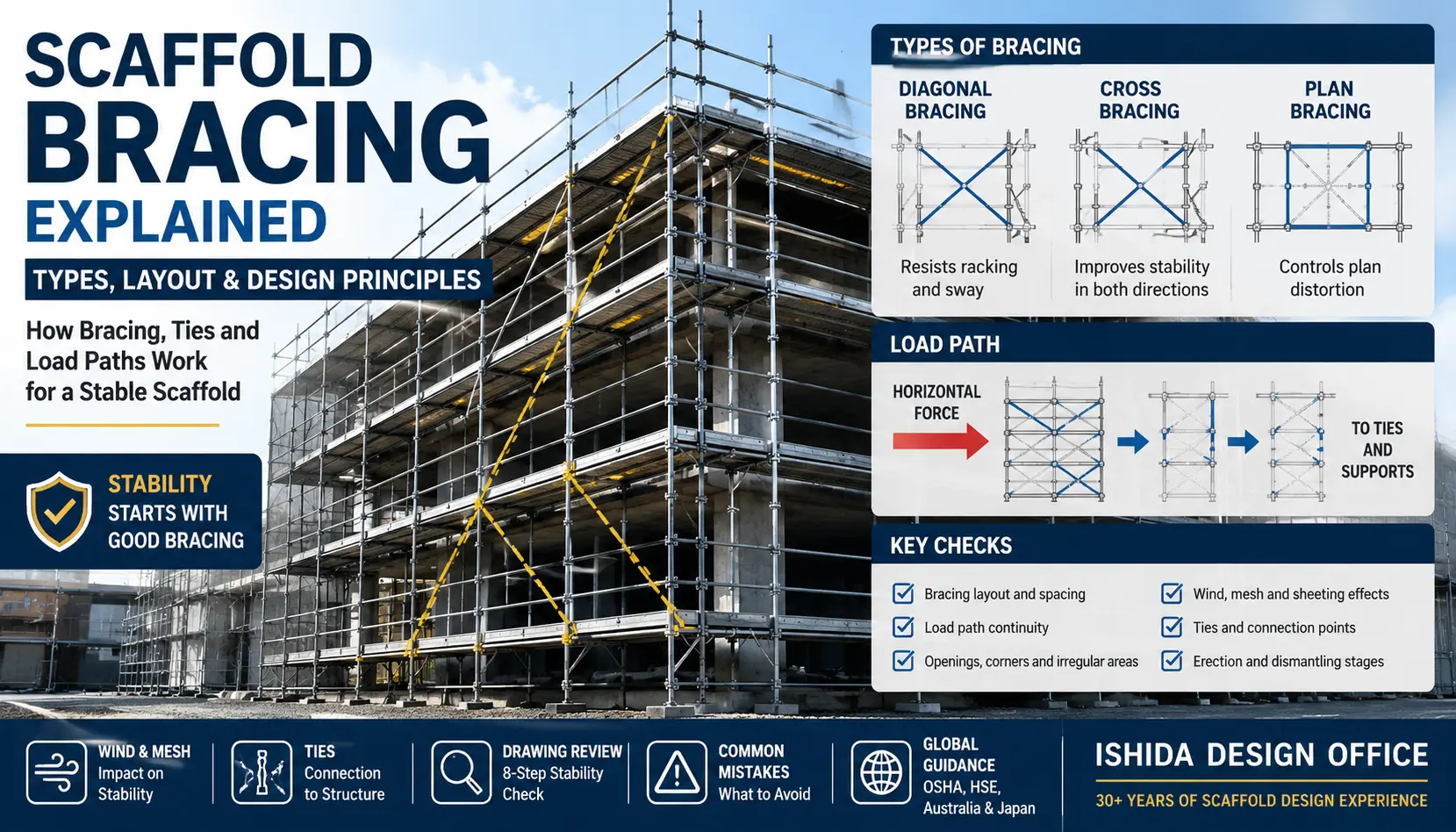
Bracing
Members used to improve scaffold stability and resist movement.
Working Platform
A platform used by workers to perform the required task.
Terminology varies between countries and scaffold systems.
Project specifications and local regulations should always take priority.
For a broader explanation of the components shown in scaffold drawings, see Complete Scaffolding Parts Overview: Names, Functions and Practical Checks.
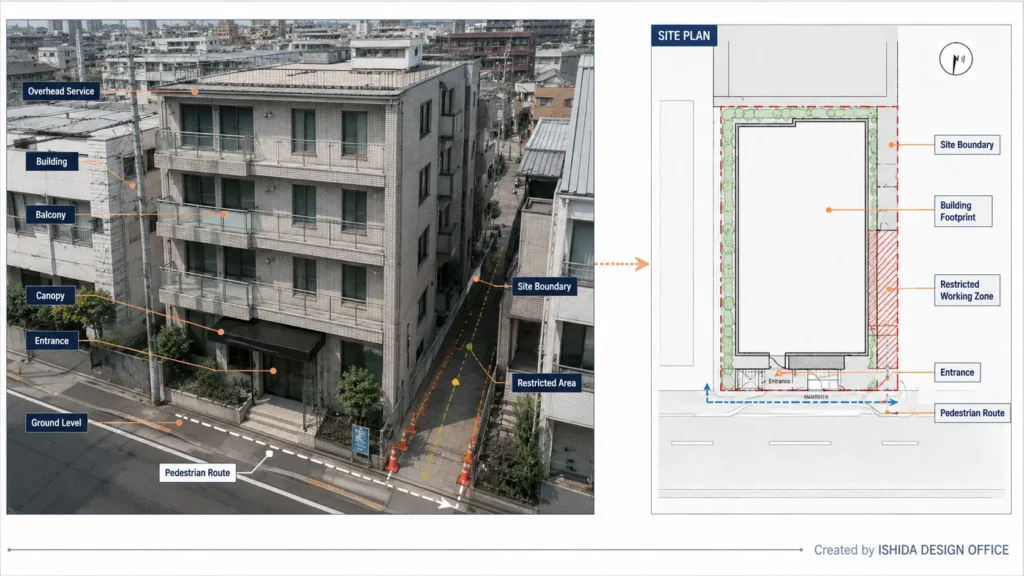
Step 1: Understand the Building Before Drawing the Scaffold
The first step is not choosing the bay length.
It is understanding what the scaffold must fit around.
In renovation work especially, the architectural drawing and the actual site do not always tell exactly the same story.
Existing conditions may include:
- balconies
- signs
- pipes
- canopies
- temporary roofs
- landscaping
- electrical equipment
- changed entrances
- temporary work areas
So I try to understand both the drawings and the real site whenever possible.
Building Information
I normally look for:
- building footprint
- facade lengths
- overall height
- floor levels
- balconies
- parapets
- roof projections
- canopies
- entrances
- windows
- setbacks
- changes in facade geometry
Site Information
I also check:
- site boundaries
- neighbouring properties
- roads
- pedestrian routes
- overhead services
- ground-level changes
- ramps
- steps
- material delivery routes
- crane or hoist interfaces
- restricted working areas
A scaffold can fit perfectly around the architectural drawing and still be impossible to install because the site boundary sits exactly where the outer standard needs to go.
That is why I try to identify restrictions early.
A Simple Rule I Use
If an important dimension is not confirmed, I do not quietly pretend that it is.
I would rather mark:
VERIFY ON SITE
than hide uncertainty inside a clean-looking drawing.
A visible question is usually safer than an invisible assumption.
Step 2: Define What the Scaffold Is Supposed to Do
The next question is simple:
Why is this scaffold being built?
A scaffold for painting may not require the same arrangement as a scaffold for facade replacement, masonry, inspection, or heavy material work.
Before fixing the geometry, I want to understand the task.
| Design Question | Why It Matters |
|---|---|
| What work will be performed? | Determines working positions and platform needs |
| Which lifts require platforms? | Influences vertical arrangement |
| Will materials be stored? | Affects loading considerations |
| How will workers access the scaffold? | Affects stair and ladder positions |
| Will sheeting or netting be installed? | Can affect wind actions |
| Are loading bays required? | May need separate consideration |
| Are public routes nearby? | Affects protection and access |
| Are there restricted tie locations? | Affects stability planning |
| How long will the scaffold remain? | Influences planning and management |
A common mistake is to treat the scaffold configuration as fixed before understanding the work.
The better approach is the opposite.
The scaffold should follow the work requirement.
Step 3: Confirm the Scaffold System
Once I understand what the scaffold must do, I confirm which scaffold system will actually be used.
This is essential.
Different systems may use different:
- bay lengths
- lift increments
- platform widths
- connection methods
- brackets
- decks
- guardrails
- stairs
- base components
- tie components
- bracing
- allowable loads
Manufacturer documentation should therefore be part of the drawing process.
I do not want to design a generic imaginary scaffold.
I want to design the scaffold system that will actually arrive on site.
If you need to identify the individual components before developing the layout, see Scaffolding Parts Explained: Names, Sizes and Functions (Complete Guide).
Do Not Assume Different Systems Are Interchangeable
Components from two manufacturers may look similar.
That does not automatically mean they are compatible.
Always confirm compatibility, structural adequacy, and manufacturer requirements.
Step 4: Establish the Basic Scaffold Geometry
Now I begin thinking about the geometry.
For a typical facade scaffold, three directions quickly become important:
X = Bay Length
Y = Transverse Geometry — Scaffold Width and Building Clearance
Z = Lift Height
These three directions create the basic scaffold grid.
But they are connected.
Bay length can influence:
- standard positions
- corners
- loading
- openings
Scaffold width can influence:
- working space
- site boundary
- clearance
Lift height can influence:
- platform position
- floor levels
- access
- top protection
This is why I do not select these dimensions independently.
There is no single universal bay length, scaffold width, or lift height that should be copied from one project to another.
For a more detailed explanation of these basic dimensions, see Scaffold Dimensions Explained: Bay Length, Lift Height, Width & Standards.
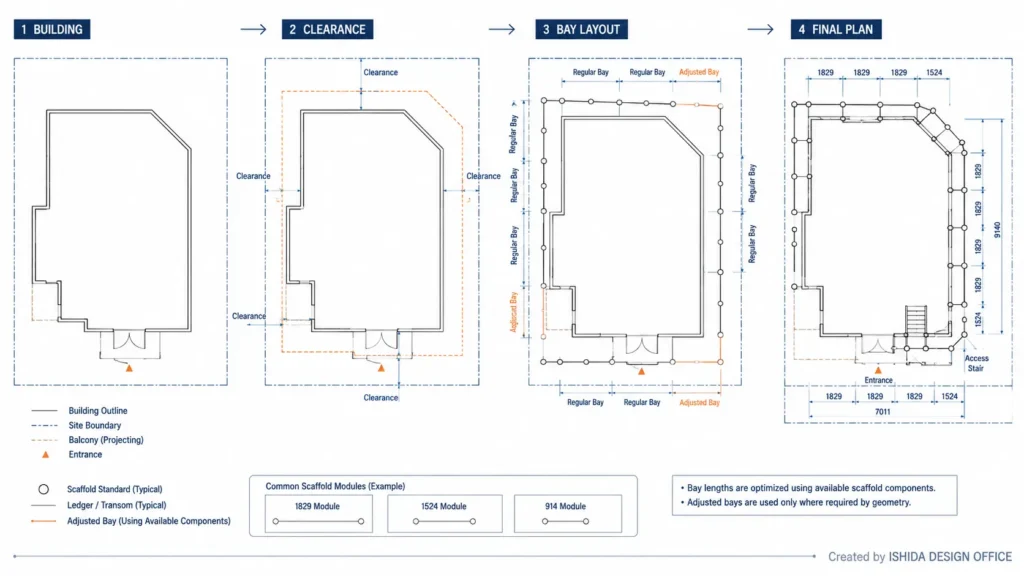
Step 5: Create the Scaffold Plan
For a typical building perimeter scaffold, I usually establish the plan first.
The plan defines:
- horizontal standard positions
- scaffold offset
- bay arrangement
- corners
- access
- overall footprint
If the plan is wrong, the elevation normally inherits the problem.
My basic sequence is:
Building → Clearance → Scaffold Envelope → Bay Layout → Corners → Upper-Floor Check
5.1 Draw the Building Accurately
Start with the building.
Include:
- facade lines
- balconies
- entrances
- projections
- setbacks
- important openings
- site boundaries where relevant
Do not remove difficult geometry just because it makes the scaffold easier to draw.
The difficult area is usually where the design needs the most attention.
5.2 Establish the Scaffold Offset
Next, establish the initial scaffold position relative to the facade.
The correct clearance depends on:
- work type
- scaffold system
- platform configuration
- brackets
- facade geometry
- fall-protection requirements
- project specification
- local regulations
In Japanese wedge-scaffold work, I may begin with a practical target clearance and then adjust the scaffold position while fitting the available scaffold modules.
The important lesson is not a specific number.
It is this:
Building clearance and bay layout must be considered together.
5.3 Draw the Approximate Scaffold Envelope
Before placing every standard, look at the whole scaffold footprint.
Ask:
- Does it fit inside the site?
- Does it block an entrance?
- Is pedestrian access maintained?
- Does it clash with a balcony?
- Is there enough room at the corner?
- Is material delivery still possible?
At this stage, moving the scaffold is easy.
Later, after hundreds of components have been placed, the same change becomes much more difficult.
5.4 Divide the Scaffold Into Real Bays
Now begin arranging bays.
Suppose the facade does not divide neatly into the preferred bay length.
That is normal.
Do not force the facade into mathematically equal sections.
Start with efficient standard modules and distribute the remaining length using real components that exist in the selected scaffold system.
This is one of the most useful practical lessons I can give a new scaffold CAD designer.
DESIGN TIP
Good bay layout is usually an optimisation problem, not a division problem.
Do not ask only:
“How can I divide this line?”
Ask:
“How can I arrange real scaffold components efficiently around this building?”
5.5 Check the Corners
A layout can work perfectly along one facade and fail where two elevations meet.
Check:
- standard positions
- platform continuity
- inside clearance
- guardrails
- brackets
- tie locations
- neighbouring bay dimensions
Do not finish one elevation in isolation.
The entire perimeter should work as one scaffold.
For more practical guidance on turning this geometry into a working CAD drawing, see How to Create Scaffold CAD Drawings That Actually Work on Site.
5.6 Check the Upper Floors
This is particularly important for buildings with:
- balconies
- setbacks
- projecting floors
- roof changes
- different upper-floor footprints
I often check upper-floor geometry while developing the lower scaffold plan.
Otherwise, a perfectly optimised ground-level arrangement can become impossible higher up.
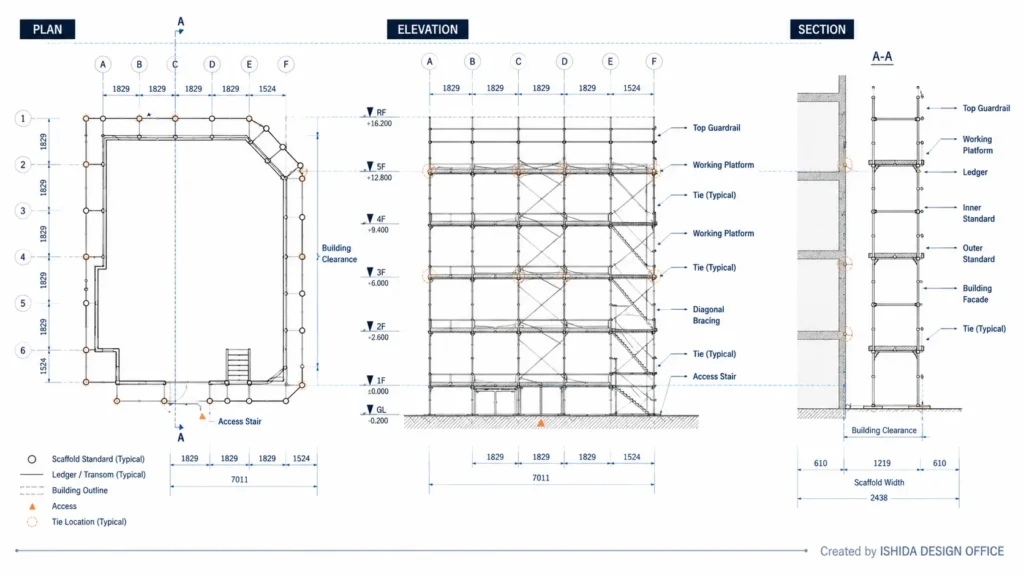
Step 6: Create the Scaffold Elevation
Once the horizontal geometry is reasonably stable, I move into elevation.
The plan tells me:
Where are the standards horizontally?
The elevation tells me:
What happens vertically?
I normally establish the important building levels first.
These may include:
- ground level
- floor levels
- roof level
- parapet level
- balcony levels
Then I develop:
- scaffold lifts
- working platforms
- guardrails
- access
- ties
- bracing
Start With the Building
Do not begin by filling the elevation with repeated scaffold lines.
Start with the building.
The scaffold working levels need to relate to the actual work face.
The platform must be where workers need it.
The top lift must make sense at the roof.
The first lift must make sense at ground level.
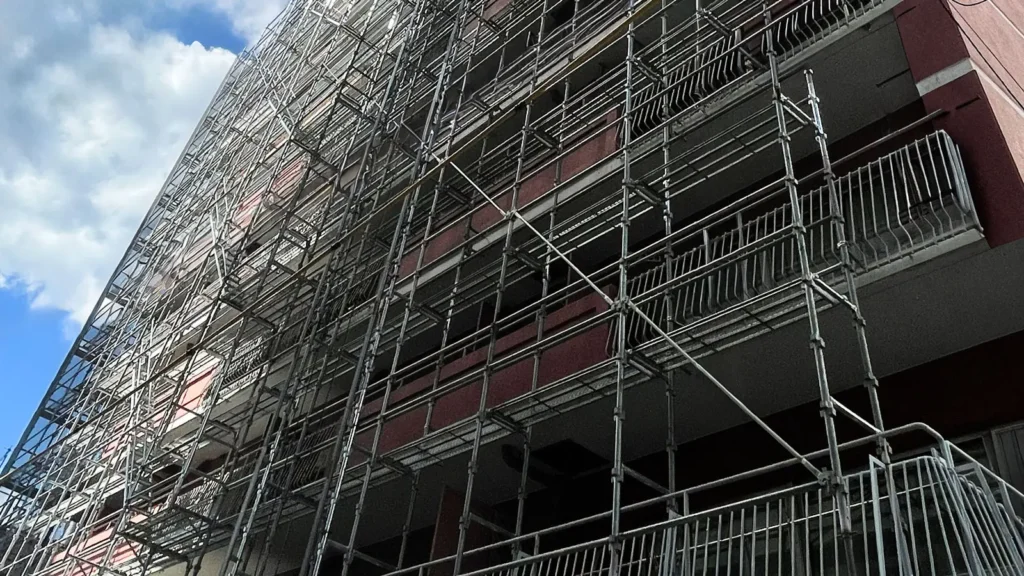
Step 7: Pay Special Attention to the Bottom and Top
The middle of a scaffold is often repetitive.
The bottom and top usually are not.
Bottom Conditions
At ground level, look for:
- slopes
- steps
- different pavement levels
- entrances
- drainage
- base-level changes
- obstructions
A small error at the bottom can continue upward through the entire scaffold.
Top Conditions
At roof level, check:
- parapets
- eaves
- roof access
- roof projections
- required working position
- edge protection
- top guardrail requirements
Do not stop the scaffold just because the elevation looks visually balanced.
The top needs to match the actual work.
Step 8: Create the Critical Sections
Plan and elevation cannot explain everything.
A section shows the relationship between the scaffold and the building across its width.
I create sections where the geometry changes or where the drawing may otherwise be misunderstood.
Typical section locations include:
- normal facade
- balcony
- canopy
- parapet
- roof edge
- setback
- loading platform
- pedestrian passage
- projecting facade
- bracket area
A useful section may show:
- building face
- scaffold standards
- platform
- scaffold width
- building clearance
- brackets
- guardrails
- toe protection
- ties
- floor levels
- important dimensions
One section is not always enough.
If three facade conditions are different, I would rather draw three clear sections than force one generic section to explain everything.
If you want to understand more clearly what information belongs in each drawing view, see Scaffold Plan vs Elevation vs Section: What Each Drawing Shows.
Step 9: Add Access Before the Design Becomes Too Fixed
Access is easy to forget when a designer concentrates only on scaffold geometry.
But workers still need to enter and move through the scaffold.
Consider:
- stair towers
- ladder bays
- internal ladders
- access gates
- platform openings
- material movement
- emergency routes
Access should also be coordinated with:
- ties
- bracing
- entrances
- loading areas
- working platforms
Do not simply find an unused bay and label it:
STAIR
Ask whether the access position makes sense for the workers who will use it.
Step 10: Add Ties and Bracing as Part of the Design
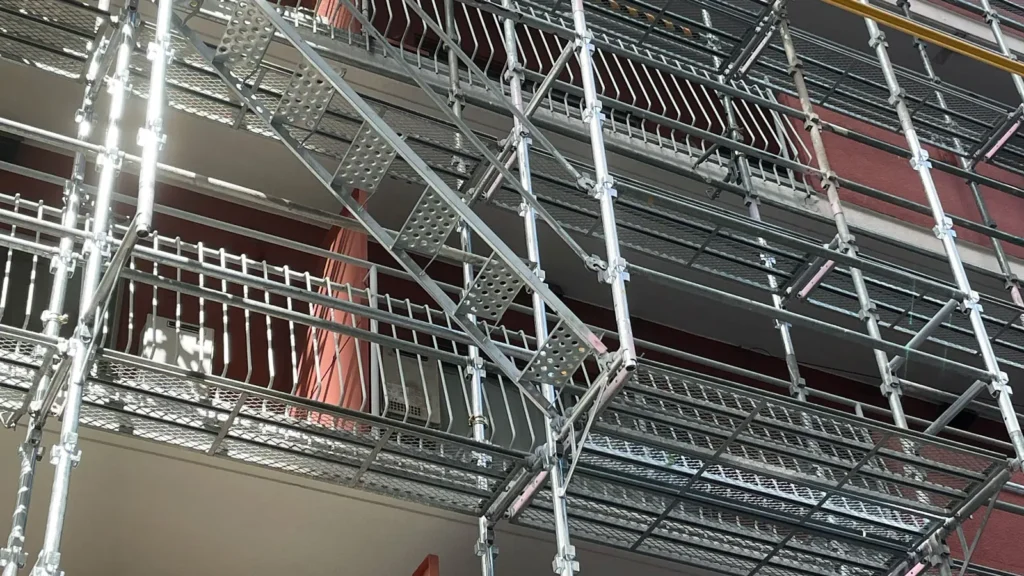
Ties and bracing are not decorative symbols.
They are part of the stability system.
That means they should be considered together with the scaffold geometry.
Tie Layout
Before placing ties, ask:
What am I tying into?
A regular CAD grid may look excellent.
But proposed tie locations may coincide with:
- windows
- cladding
- openings
- balconies
- services
- locations unsuitable for structural connection
DO NOT ASSUME
A tie symbol does not create a real connection.
The tie arrangement must relate to the actual building or supporting structure.
For a deeper explanation of tie types, spacing principles, and layout, see Scaffold Ties Explained: Types, Spacing & Layout.
Bracing
Bracing also needs coordination.
Check whether braces conflict with:
- access bays
- stairs
- pedestrian routes
- vehicle openings
- loading areas
- work locations
A brace passing straight through an access opening is an obvious drawing error.
But it can still happen when bracing is added too late.
For more detail on brace types, positioning, and design principles, see Scaffold Bracing Explained: Types, Layout & Design Principles.
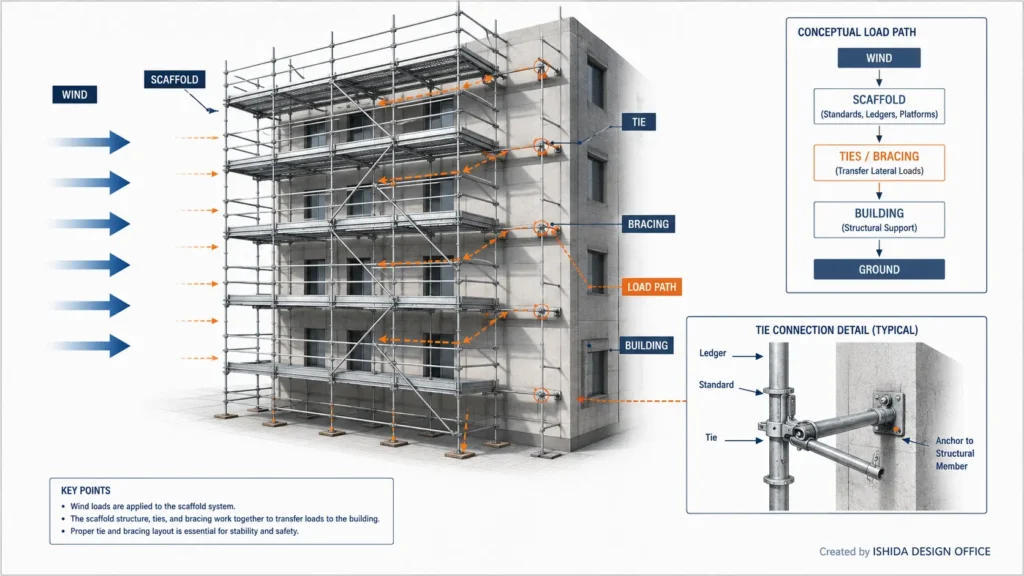
Think About the Load Path
When I review a stability arrangement, I often ask:
Where does the force go?
At a conceptual level:
WIND → SCAFFOLD → TIES / BRACING → SUPPORTING STRUCTURE
The actual structural behaviour may be much more complex.
But if the basic load path cannot be explained, the design deserves another look.
Step 11: Resolve the Difficult Areas
Standard scaffold is usually the easy part.
The difficult areas are the exceptions.
Typical problem areas include:
- building entrances
- vehicle routes
- balconies
- canopies
- projecting roofs
- loading bays
- setbacks
- sloping ground
- temporary roofs
- narrow site boundaries
- signs
- mechanical equipment
A principle I strongly recommend is:
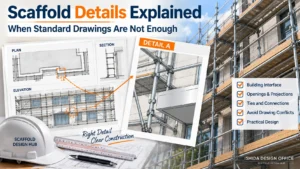
The more unusual the condition, the more clearly it should be drawn.
If the scaffold changes width, show it.
If an entrance requires a different arrangement, draw it.
If a balcony changes the standard positions, add a section.
If a standard tie cannot be used, identify the alternative design.
Do not hide complicated conditions behind a generic note.
The unusual area deserves more information, not less.
Japanese Practice Note
In Japanese scaffold drawing work, I often pay particular attention to how the scaffold fits into a limited physical space before refining the drawing itself.
Renovation projects may involve narrow boundaries, building entrances, pedestrian routes, neighbouring properties, and relatively limited areas for material handling. Because of this, a theoretically neat scaffold grid may not always be the most practical arrangement.
When drawing wedge-type scaffold plans, I normally begin by understanding the building geometry and required working clearance. I then arrange actual available scaffold modules around that geometry rather than forcing the entire facade into artificially equal bays.
Corners, entrances, upper-floor setbacks, and projecting elements are checked before I consider the plan complete.
The same thinking continues into the elevation.
I prefer to show the building floor levels clearly so that platform positions can be checked against the actual work face rather than simply repeating scaffold lifts without reference to the building.
This approach is not uniquely Japanese, and I would not suggest that one country’s method is automatically better than another.
The useful principle is:
Coordinate real components, real site space, and real work requirements before construction begins.
Requirements vary by country, jurisdiction, and project.
Always confirm local regulations, project specifications, and the scaffold manufacturer’s instructions.
Step 12: Add Dimensions, Notes and Details
A scaffold drawing is not finished when all the scaffold members are visible.
Someone who did not create the drawing still needs to understand it.
Typical Plan Dimensions
- bay lengths
- overall scaffold dimensions
- scaffold width
- building clearance
- boundary clearance
- entrance width
- opening dimensions
Typical Elevation Dimensions
- scaffold height
- floor levels
- lift levels
- platform levels
- opening heights
- top scaffold condition
Typical Notes
- scaffold system
- manufacturer or specification
- loading assumptions
- tie requirements
- sheeting or netting
- design assumptions
- drawing limitations
- site verification requirements
- drawing status
- revision
Do not fill the drawing with notes that nobody can read.
Good drawing information is:
- specific
- visible
- useful
Step 13: Cross-Check Plan, Elevation and Section
This is one of the most important stages in my workflow.
When I finish drawing, I stop looking at each view independently.
I start comparing them.
Plan ↔ Elevation
Check:
- Do standard positions correspond?
- Do bay lengths agree?
- Is the stair in the same location?
- Do entrances match?
- Are tie locations coordinated?
Elevation ↔ Section
Check:
- Do platform levels correspond?
- Does scaffold width agree?
- Are brackets shown consistently?
- Does the building geometry match?
Plan ↔ Section
Check:
- Does the facade clearance agree?
- Is the section taken from the correct location?
- Does it show the real condition?
Drawing ↔ Site
Finally, ask:
- Does the scaffold fit?
- Is access maintained?
- Are entrances usable?
- Are site boundaries respected?
- Can the ties actually be installed?
- Are the components available?
- Has anything changed since the site survey?
Many drawing errors are not CAD errors.
They are coordination errors.
If your role is to review drawings rather than create them, How to Read Scaffold Drawings: Plan, Elevation, Section & Details explains what to check in each view.
Scaffold Drawing Cross-Check Table
| Item | Plan | Elevation | Section | Site |
|---|---|---|---|---|
| Building geometry | ✓ | ✓ | ✓ | ✓ |
| Bay positions | ✓ | ✓ | — | ✓ |
| Scaffold width | ✓ | — | ✓ | ✓ |
| Building clearance | ✓ | — | ✓ | ✓ |
| Lift levels | — | ✓ | ✓ | ✓ |
| Access | ✓ | ✓ | If needed | ✓ |
| Ties | ✓ | ✓ | If needed | ✓ |
| Bracing | ✓ | ✓ | If needed | ✓ |
| Openings | ✓ | ✓ | If needed | ✓ |
| Ground conditions | ✓ | ✓ | ✓ | ✓ |
| Special areas | ✓ | ✓ | ✓ | ✓ |
| Revision | ✓ | ✓ | ✓ | — |
This kind of simple table is far more reliable than trying to remember everything at the end.
Step 14: Review the Drawing as If You Did Not Create It
Before issuing the drawing, I try to change perspective.
Instead of asking:
“Did I finish the drawing?”
I ask:
“If I received this drawing tomorrow, would I understand what to build?”
That question often reveals problems that were invisible during drafting.
For more lessons drawn from long-term scaffold design practice, see What 30 Years of Scaffold Design Has Taught Me.
Final Drawing Checklist
- Correct project name
- Correct drawing number
- Correct revision
- Correct scaffold system
- Building geometry confirmed
- Site restrictions identified
- Bay layout coordinated
- Corners checked
- Upper-floor geometry checked
- Scaffold width confirmed
- Building clearance reviewed
- Lift levels coordinated
- Access shown
- Working platforms identified
- Tie arrangement shown or referenced
- Bracing shown or referenced
- Special areas detailed
- Loading assumptions stated where required
- Plan, elevation, and section cross-checked
- Structural calculations referenced where required
- Site-verification notes included where required
- Revision changes controlled
Then the drawing can move through the required checking and approval process.
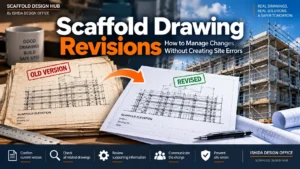
REVISION CHECK
A revision number matters.
A drawing date matters.
Drawing status matters.
On a busy site, an outdated drawing that looks almost identical to the current revision can create serious confusion.
Common Scaffold Drawing Mistakes
After reviewing many scaffold drawings, I see the same problems repeatedly.
Most are preventable.
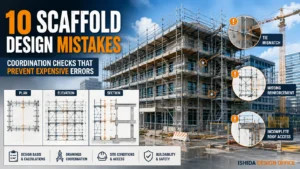
1. Starting CAD Before Understanding the Site
It feels faster at first.
It often creates revisions later.
2. Designing a Generic Scaffold Instead of the Actual System
A CAD line does not mean a component exists.
Check the manufacturer documentation.
3. Using Mathematically Perfect but Impractical Bay Layouts
Buildings rarely divide perfectly into standard scaffold modules.
Use real component sizes.
4. Solving One Facade Without Checking the Corner
A perfect elevation can create an impossible corner.
Review the entire building perimeter.
5. Ignoring Upper-Floor Geometry
A ground-floor arrangement may work perfectly while a balcony or setback makes it impossible higher up.
Look vertically while designing horizontally.
6. Drawing the Elevation Without Building Levels
Scaffold lifts need a relationship with the work face.
Show the important building levels.
7. Treating Ties as Repeated Symbols
A tie symbol is not a tie connection.
The proposed position must relate to the supporting structure.
8. Adding Bracing Too Late
Bracing may conflict with:
- stairs
- entrances
- access routes
- loading areas
Coordinate it earlier.
9. Forgetting Access
The scaffold must be usable, not simply geometrically complete.
10. Not Drawing Enough Sections
If the scaffold geometry changes, a section may be the clearest way to explain it.
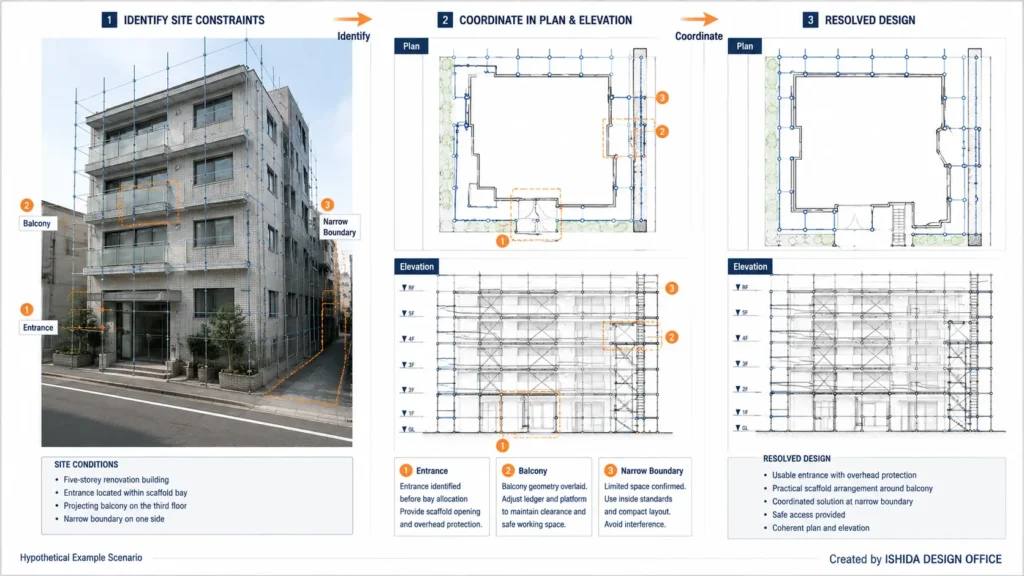
Example Scenario: Renovation Building With an Entrance
The following is a hypothetical example scenario.
Imagine a five-storey renovation building.
The facade initially appears simple.
You start with regular scaffold bays.
Then three conditions become obvious:
- the main entrance falls inside a standard bay
- a balcony projects from the third floor
- one side of the building has very limited boundary clearance
If these are discovered after the full drawing is completed, much of the design may need revision.
A better sequence is:
1. Mark the Entrance Before Bay Allocation
Keep access visible from the start.
2. Overlay the Upper-Floor Geometry
The balcony becomes part of the planning problem immediately.
3. Check the Narrow Boundary
The scaffold width or local arrangement may need to change.
4. Resolve the Difficult Areas
Solve the special conditions first.
5. Fill In the Repetitive Bays
The easy parts come later.
This leads to one of my favourite practical rules:
Solve the exceptions before polishing the repetition.
Practical Design Experience: Coordinating a Scaffold Around a Complex Building
The following plan and elevation drawings illustrate a practical design challenge from my scaffolding work. The main difficulty was not drawing individual scaffold members in CAD. It was coordinating three constraints that affected one another: the projections and recesses of the building, the scaffold bay arrangement, and the need to keep entrances accessible. The drawings are presented as a separate practical example from the hypothetical renovation scenario above.
1. Reading the Building Geometry Before Setting Out the Bays
When a building has an irregular perimeter, a repeated bay pattern cannot simply be copied around every corner. Projections, recesses and changes in wall alignment can affect the available space for standards, the distance from the working platform to the façade, and the positions where the scaffold changes direction. In my drawing process, I first study the building outline and identify these changes before committing to a regular bay sequence.
An important lesson from this type of project is that a bay arrangement that looks efficient along a straight wall can create a problem at the next recess or corner. The plan must be checked as a connected arrangement, rather than as several independent straight runs.
2. Adjusting Bay Positions Without Losing the Overall Layout
I then examine where bay lengths and standard positions need to be adjusted to respond to the building shape. Moving one standard may improve clearance at a corner but affect the next bay, the position of a platform edge, or an access route. The objective is not to force every bay into identical dimensions; it is to develop a coherent arrangement that can be checked against the actual site and the selected scaffold system.
This is why I treat the plan as a coordination drawing. Each adjustment needs to be reviewed in context, including component compatibility, working-platform requirements and the structural checks that may be necessary. A CAD drawing can show a tidy layout while still concealing an impractical arrangement if these relationships have not been considered.
3. Protecting Entrances as a Design Constraint
Entrances require attention from the beginning, not after the scaffold layout has been completed. A standard positioned according to a convenient bay rhythm may obstruct a doorway or interfere with the route people need to use. I therefore consider entrance locations while arranging the bays and identify areas where an alternative arrangement or a specifically designed opening may be required.
Keeping an entrance clear does not automatically make the scaffold above it structurally acceptable. Any opening, bridging arrangement, change in load path or omitted member must be evaluated using the applicable scaffold-system guidance and project-specific engineering requirements. The drawing should communicate the intended access condition without implying that an unverified arrangement is safe.
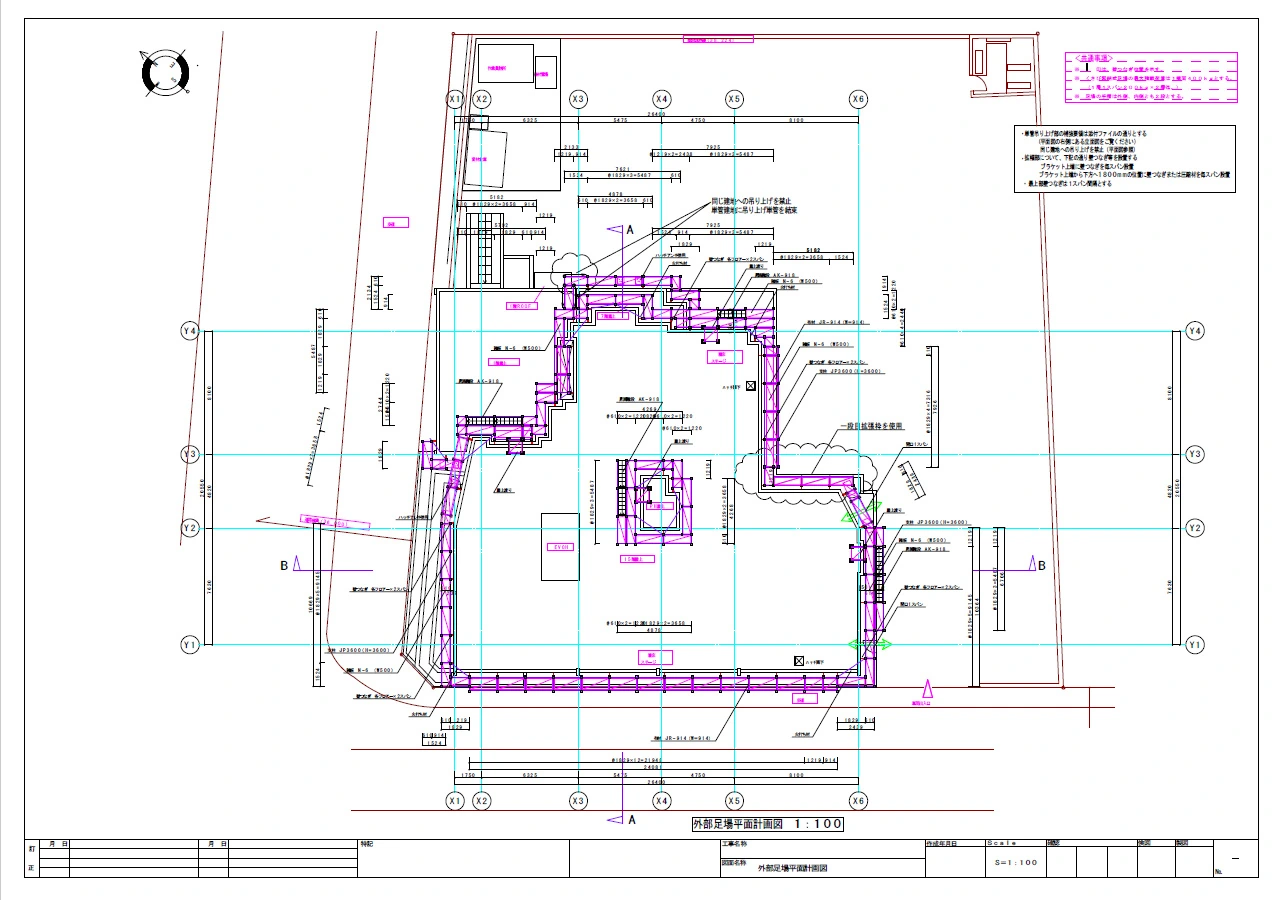
Original CAD Plan: Checking Geometry, Bays and Access Together
In the plan drawing below, the useful design question is how the scaffold arrangement relates to the building perimeter as a whole. I use this kind of plan to review changes in direction, bay continuity and the location of access constraints before relying on the elevation drawing alone.
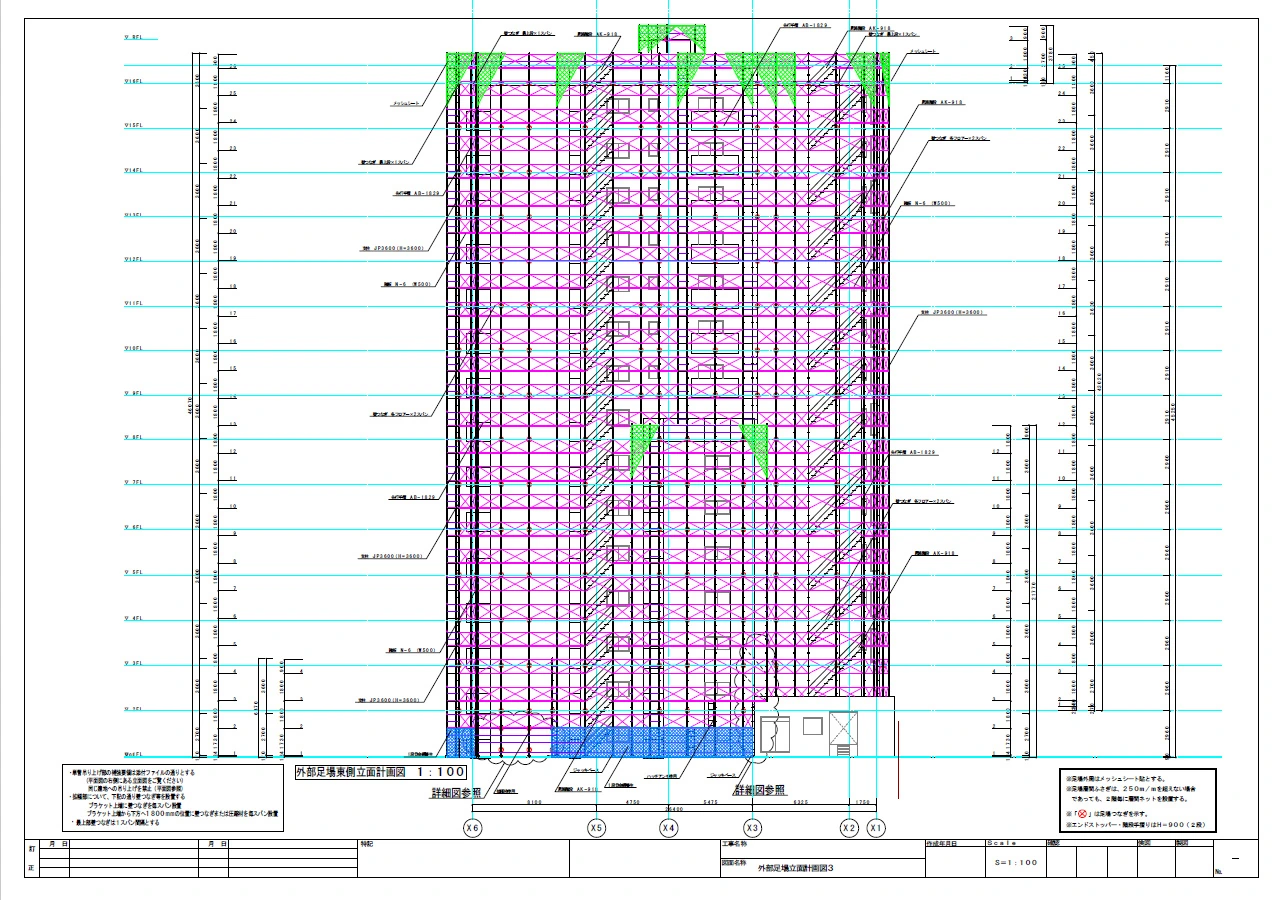
Original CAD Elevation: Checking the Vertical Consequences
After developing the horizontal arrangement, I compare it with the elevation. A change in bay layout on plan can affect how the scaffold is represented and coordinated vertically, including working levels, access, bracing and tie locations. These items must be checked against the actual system and design requirements; their adequacy cannot be established from the illustration alone.
What This Project Reinforced in My Design Practice
The most important lesson was that building geometry, bay spacing and entrance access cannot be solved separately. A decision made to improve one condition can create a new constraint elsewhere. I therefore work back and forth between the plan, the elevation and the site requirements until the arrangement is consistent enough for the necessary technical checks.
For me, a scaffold drawing is not merely a CAD representation of components. It is a record of the practical decisions needed to make the proposed arrangement understandable, buildable and ready for verification. That distinction is especially important on buildings with irregular outlines and entrances that must remain in use.
Scope note: These drawings illustrate design coordination principles. They are not a complete erection drawing, a structural calculation, or an approval for any particular scaffold configuration. Dimensions, access arrangements, ties, bracing and load paths must be verified for the actual project.
Practical Checks Before Issuing a Scaffold Drawing
Before a drawing is issued, a few simple checks can help confirm that the geometry, cost implications, and document control still make sense.
Simple Geometry Checks
A scaffold drawing article should not become a structural calculation manual.
But a few simple geometry checks can help identify mistakes.
Approximate Number of Bays
Where:
- N = approximate number of bays
- L = scaffold run length
- B = preferred bay length
The result normally needs adjustment because real buildings rarely divide perfectly into standard modules.
Approximate Number of Lifts
Where:
- N_L = approximate number of lifts
- H = scaffold height
- h = nominal lift height
These formulas do not design the scaffold.
They are simple checking tools.
If the approximate geometry and the drawing are completely inconsistent, something deserves another look.
Why Better Drawings Usually Reduce Cost
A scaffold drawing affects more than safety.
It also affects:
- material quantities
- labour
- transport
- site modifications
- drawing revisions
- erection time
- supervisor time
Poor layout can lead to:
- unnecessary short bays
- additional standards
- extra brackets
- excessive special components
- repeat deliveries
- rework
A coordinated drawing cannot eliminate every cost.
But it can reduce avoidable waste.
This is one reason I consider good scaffold drawing and cost control closely connected.
Inspection, Records and Handover
The drawing is only one part of scaffold management.
Once the scaffold is erected, the actual scaffold needs to remain aligned with the approved design and project requirements.
Useful records may include:
- approved scaffold drawing
- calculation package where required
- manufacturer information
- inspection records
- handover records
- alteration records
- photographs
- revision history
If the scaffold is changed on site, the drawing and the physical scaffold should not become two different realities.
Document control becomes a safety issue when that happens.
International Perspective: Scaffold Design Requirements
The practical drawing workflow can be used internationally.
Legal requirements cannot.
Scaffold designers and supervisors should clearly separate:
good design practice
from:
jurisdiction-specific legal compliance
United States — OSHA
OSHA’s construction scaffold requirements are contained in:
29 CFR 1926 Subpart L — Scaffolds
OSHA addresses areas including:
- scaffold capacity
- platform construction
- stability
- access
- fall protection
- inspection
- training
OSHA also uses specific definitions for competent and qualified persons.
US projects may also be affected by state or project-specific requirements.
United Kingdom — HSE
HSE guidance emphasises proper scaffold planning and competent design.
Information required during planning may include:
- intended use
- dimensions
- loads
- boarded lifts
- access
- sheeting
- ground conditions
- restrictions
Where the scaffold falls outside a generally recognised standard configuration or applicable manufacturer guidance, a project-specific design supported by calculation is required.
This supports the main principle of this article:
Good scaffold design begins with information gathering.
Australia — Safe Work Australia
Safe Work Australia provides guidance on managing scaffold risks including:
- falls
- collapse
- overhead power lines
- falling objects
Guidance also covers planning, erection, alteration, inspection, and maintenance.
Specific legal requirements can vary by state or territory.
Always check the regulator for the actual project location.
Japan
Japanese scaffold requirements are established under the Industrial Safety and Health framework, including the relevant provisions of the Ordinance on Industrial Safety and Health.
In Japanese scaffold drawing work, I also refer to:
- current legal requirements
- applicable technical guidance
- manufacturer technical information
- project specifications
Japanese dimensions or arrangements should not automatically be copied into overseas projects.
The useful principle is:
Understand the applicable requirements before converting them into CAD geometry.
Practical Scaffold Drawing Workflow
Here is the entire process in one place.
1. Collect Site Information
Building, boundary, ground, access, restrictions.
↓
2. Understand the Work
What will actually be done from the scaffold?
↓
3. Confirm the Scaffold System
Use real component dimensions.
↓
4. Establish Basic Geometry
Bay length, scaffold width, clearance, lift arrangement.
↓
5. Create the Plan
Building → Offset → Bay Layout → Corners.
↓
6. Check Upper-Floor Geometry
Balconies, setbacks, projections.
↓
7. Create the Elevation
Building levels → Lifts → Platforms.
↓
8. Check Bottom and Top Conditions
Ground and roof interfaces.
↓
9. Create Critical Sections
Explain conditions the other views cannot.
↓
10. Add Access
Stairs, ladders, gates.
↓
11. Coordinate Ties and Bracing
Check stability and conflicts.
↓
12. Resolve Irregular Areas
Entrances, canopies, narrow boundaries.
↓
13. Add Dimensions and Notes
Communicate the design clearly.
↓
14. Cross-Check All Views
Plan ↔ Elevation ↔ Section ↔ Site.
↓
15. Review Calculations Where Required
Confirm the structural design basis.
↓
16. Final Review
Revision, status, assumptions.
↓
ISSUE THE CONTROLLED DRAWING
That is the workflow I recommend.
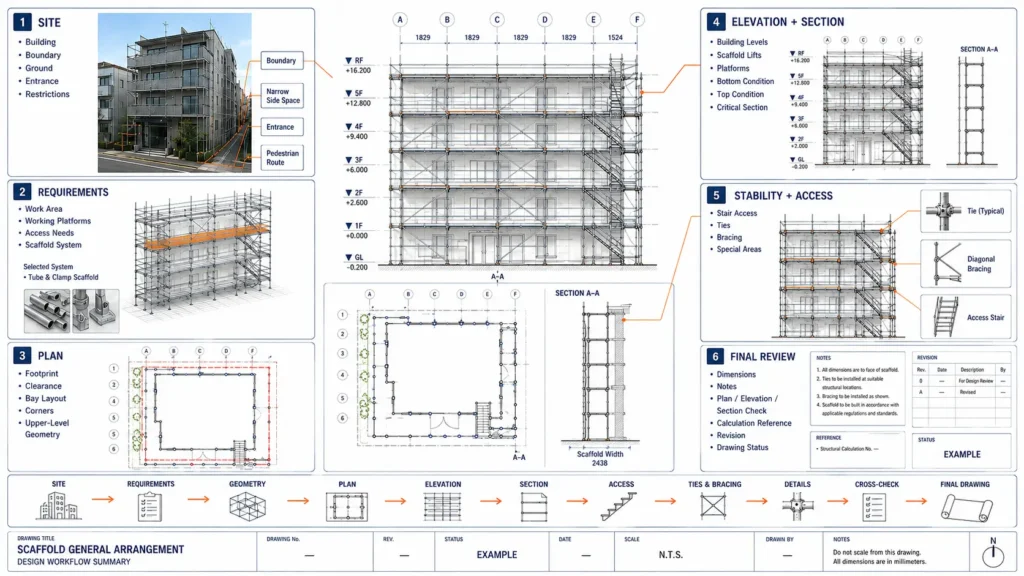
Practical Checklist for Your Next Drawing
Before starting your next scaffold drawing, ask these questions.
Site
- Do I have the latest building drawing?
- Is the site boundary known?
- Are ground levels reliable?
- Are entrances and pedestrian routes identified?
- Are overhead hazards known?
Scaffold System
- Do I know the scaffold system?
- Do I have manufacturer information?
- Do I know the available bay sizes?
- Do I know the intended work?
- Do I know the required working levels?
Plan
- Does the scaffold fit?
- Are the corners realistic?
- Are upper-floor changes considered?
- Is access maintained?
- Is building clearance intentional?
Elevation
- Are building floor levels shown?
- Are platform levels practical?
- Is the first lift realistic?
- Is the top condition resolved?
Stability
- Can proposed ties actually connect to the structure?
- Does bracing conflict with access?
- Does the arrangement require specific structural design?
Final Review
- Do plan, elevation, and section describe the same scaffold?
- Can someone unfamiliar with the project understand the drawing?
- Are assumptions clearly identified?
- Is the correct revision being issued?
If you can answer those questions confidently, your drawing is already in much better condition.
FAQ
Should I Draw the Scaffold Plan or Elevation First?
For many building-perimeter scaffolds, I prefer to establish the plan first because the bay arrangement and building clearance determine the horizontal geometry.
However, I check the elevation early.
Floor levels, balconies, and working heights may require changes to the plan.
Plan and elevation should be treated as a conversation, not two separate drawings.
Do I Need CAD Software to Create a Scaffold Drawing?
Not every simple planning sketch requires CAD.
However, professional scaffold drawings are commonly produced using CAD because it makes:
- dimensions
- revisions
- coordination
- drawing control
much easier.
The important question is not which software you use.
It is whether the drawing clearly communicates a safe, realistic, and buildable scaffold arrangement.
What Is the Most Important Dimension in a Scaffold Drawing?
There is no single most important dimension.
Bay length, lift height, scaffold width, and building clearance all affect the design.
The important point is that they are coordinated with:
- the scaffold system
- the work
- the building
- the site
Can I Use the Same Scaffold Layout for Different Manufacturers?
Do not assume so.
System dimensions, connections, component geometry, and load capacities may differ.
Always check the relevant manufacturer documentation.
When Does a Scaffold Need Structural Calculations?
This depends on:
- jurisdiction
- scaffold type
- height
- loading
- configuration
- manufacturer guidance
- whether the arrangement falls within an accepted standard configuration
Check the requirements for the actual project before deciding that calculations are unnecessary.
Who Should Design a Scaffold?
Requirements vary internationally.
Depending on jurisdiction and scaffold complexity, design may need to be performed or verified by a competent or qualified person.
Always identify the applicable local requirements.
Related Topics
If you want to continue learning, these are the most useful next articles.
Scaffold Plan vs Elevation vs Section: What Each Drawing Shows
Useful if you want to understand the relationship between drawing views.
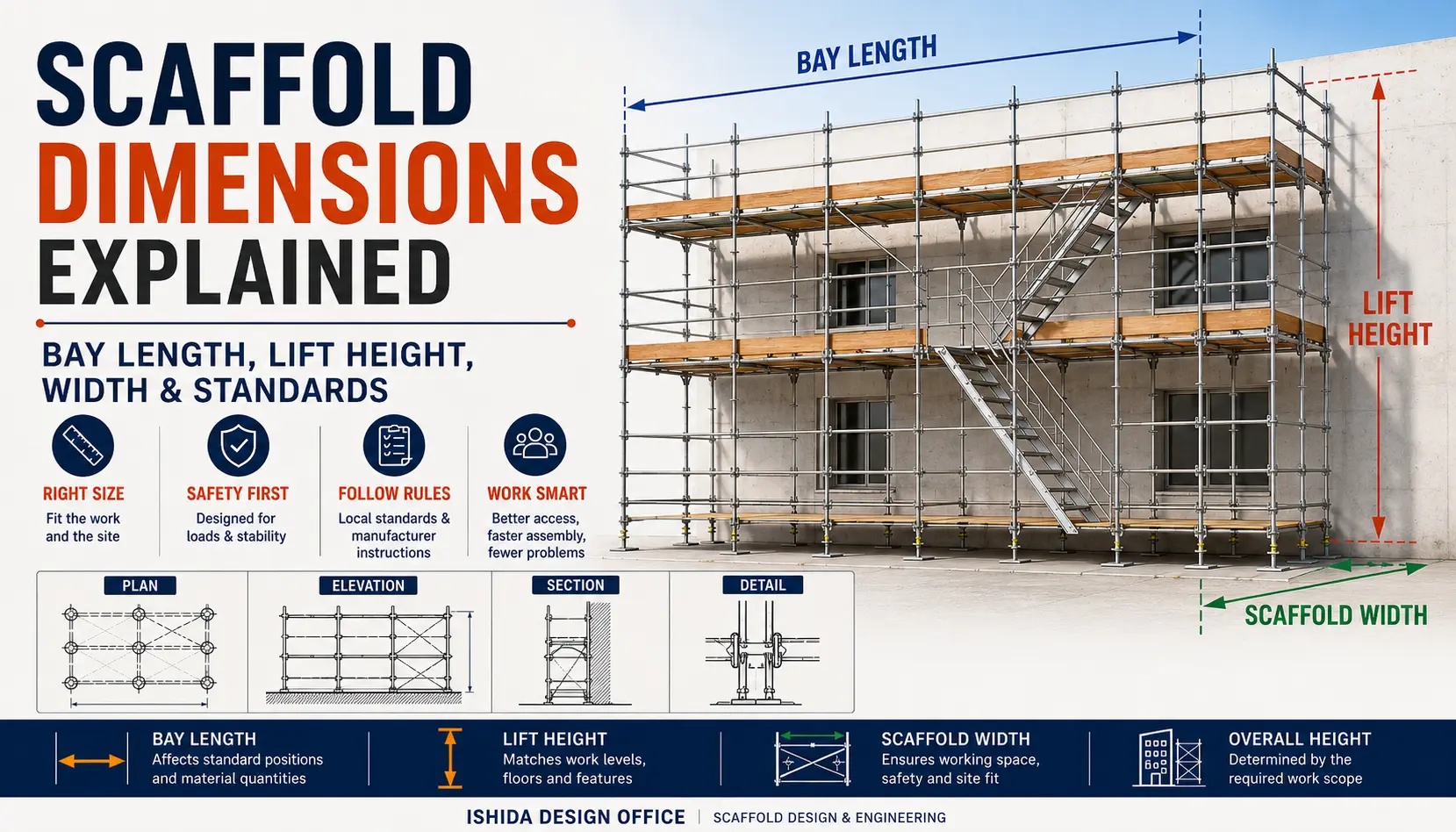
Scaffold Dimensions Explained: Bay Length, Lift Height, Width & Standards
Useful when deciding the basic scaffold geometry.
Scaffold Ties Explained: Types, Spacing & Layout
Useful once the scaffold geometry is established.
Scaffold Bracing Explained: Types, Layout & Design Principles
Useful when developing stability arrangements.
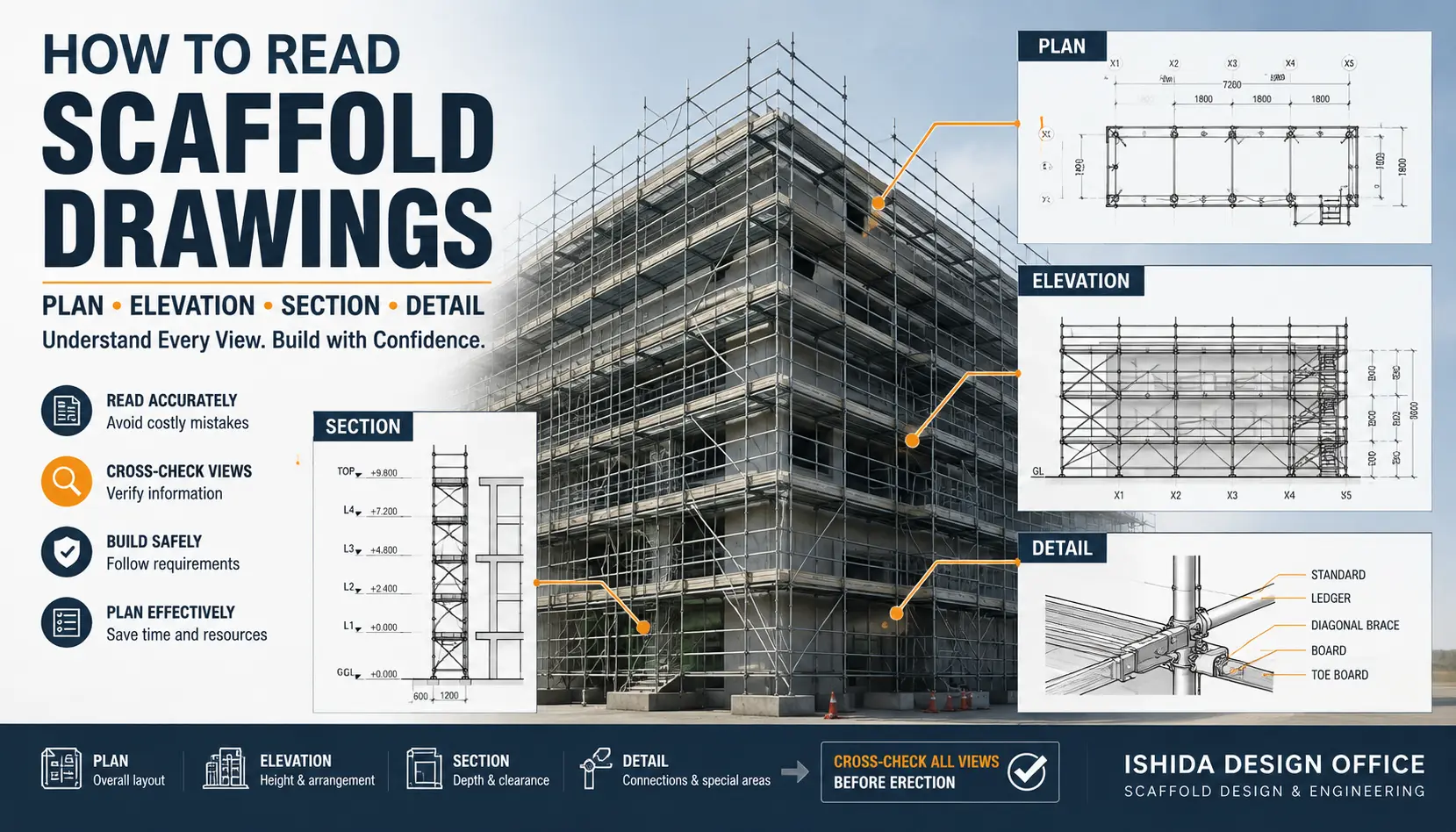
How to Read Scaffold Drawings: Plan, Elevation, Section & Details
Useful for supervisors and engineers reviewing completed scaffold drawings.
Key Takeaways
If you remember only five things from this article, remember these:
- Start with the building and site, not CAD.
- Use real scaffold-system dimensions.
- Develop plan, elevation, and section as one coordinated design.
- Treat access, ties, bracing, and irregular areas as design issues.
- Cross-check the drawing against the real site before issue.
A good scaffold drawing does not need to look complicated.
It needs to make a complicated situation easier to understand.
That is the standard I try to follow in my own work.
Conclusion
After more than 30 years working with temporary works and scaffold drawings, I still believe that the most valuable part of drawing is not drawing faster.
It is finding the problem before the scaffold reaches the site.
A few minutes spent checking:
- a corner
- a floor level
- an entrance
- a balcony
- a tie location
can prevent far more difficult work later.
I hope this article helps make your next project a little safer, smoother, and more economical.
If you find this practical approach useful, I hope you will visit again.
My goal with ISHIDA DESIGN OFFICE is to share practical scaffold knowledge that is often difficult to learn from regulations alone.
Keep looking carefully at the small details. They are often where good scaffold design begins.
Official References
The following official and first-hand sources support the regulatory, technical, and practical points discussed in this article.
Government and Regulations
United States — Occupational Safety and Health Administration (OSHA)
29 CFR 1926 Subpart L — Scaffolds
Official OSHA scaffold requirements covering areas such as design, capacity, platform requirements, access, fall protection, inspection, and training.
United Kingdom — Health and Safety Executive (HSE)
Scaffolds — Scaffold Design and Planning
Official UK guidance covering scaffold planning, competent design, standard configurations, and project-specific design requirements.
Australia — Safe Work Australia
Guide to Scaffolds and Scaffolding
Official national guidance for managing risks associated with scaffolds and scaffolding work. State and territory requirements should also be checked for the actual project location.
Japan — Ministry of Health, Labour and Welfare
Ordinance on Industrial Safety and Health — Scaffolding Provisions
Official Japanese regulations covering scaffold materials, erection, alteration, supervision, fall prevention, inspection, and related requirements.
Industry Guidance
National Access & Scaffolding Confederation (NASC)
NASC ePortal — TG20 and TG30 Guidance
NASC provides TG20 guidance for tube-and-fitting scaffolding and TG30 guidance for system scaffolding, including recognised standard configurations used in UK scaffold planning.
Manufacturer Technical Information
Layher
Layher Technical Documentation and Downloads
Official technical documentation, assembly information, product information, drawings, and material requirement resources for Layher scaffold systems.
Official information for the PERI UP scaffolding system and related system applications.
ISHIDA DESIGN OFFICE First-Hand Resources
Scaffold Plan Drawing Practice — ISHIDA DESIGN OFFICE
Wedge Scaffold Elevation Drawing Practice — ISHIDA DESIGN OFFICE
Japanese Scaffold Regulations and Practical Notes — ISHIDA DESIGN OFFICE
Requirements Notice
IMPORTANT
Requirements vary by country, jurisdiction, scaffold system, and project.
Always follow local laws, project specifications, and the scaffold manufacturer’s instructions.
Where structural engineering or project-specific calculations are required, the scaffold should be designed and verified by an appropriately competent or qualified person.
Last Verified
August 2026
All external references listed above were checked as accessible at the time of this update. Official guidance should always be checked again before applying legal or technical requirements to a live project.
About the Author
ISHIDA DESIGN OFFICE brings more than 30 years of practical experience in Japan, specializing in scaffolding design, temporary works planning, CAD drafting, quantity estimation, and construction support.
Drawing on experience from residential, commercial, and industrial projects, he shares practical insights that emphasize not only sound engineering design but also buildability, safety, and real-world jobsite application.
At Scaffold Design Hub, he combines practical experience from Japan with official guidance and technical resources from government agencies, manufacturers, and industry organizations around the world to provide reliable, practical information for construction professionals.
To learn more, visit the About page. For questions or project inquiries, please use the Contact page.